
FAQ
Loan Payments from an External Source FAQ
- When will my payment(s) post?
Payment(s) will be posted the next business day before the Credit Union opens for regular business. If paying via ACH 1 , your payment may take 2-5 business days to post. Please consider this when scheduling your payment using ACH.
- What is the fee for making a payment?
Fees vary depending upon the method used to make your payment:
- When making an on-time payment via ACH 1 through eBranch, there is no fee.
- When making an on-time payment via ACH 1 through our online payment system, there is no fee.
- When making an on-time, over-the-phone agent-assisted payment with your debit card, there is a $7.50 fee.
- When making an on-time, over-the-phone payment with your debit card using our automated phone system, there is a $4.95 fee.
To make a loan payment with your debit card over the phone with either an agent or using the automated phone system, please call 888.252.8932 and follow the prompts. Additional fees may apply for late payments.
- Can I make more than one payment at a time?
Yes, but not as a single transaction. For example, if you wanted to make your normal payment and then make an additional payment just to the principal, it would be best to process them as separate transactions, regardless of the method you are making your payment.
- What do I need to make my payment?
When making an ACH 1 payment from an external financial institution, you need the routing/ABA# and account number. If you are making the ACH 1 payment from inside of eBranch online banking, you can either set up a connection to the external account manually or via your online banking credentials from the other institution.
You will need your debit card when making your payment over the phone.
- Can I set up recurring payments?
Yes.
- Can I pay off my loan?
Interest is added daily to your loan. Please call our call center at 888.252.8932 or visit a branch to ensure the correct payoff amount.
- Who can make payments?
Only primary and joint owners listed on the loan(s) can make payments.
- Can I pay less/more than the minimum due?
Yes, however, paying less than the minimum amount due will still leave a balance due on the regular due date. Partial payments are not allowed for Mortgages, and if the amount paid is less than the normal amount due for the mortgage, it is applied as a principal-only payment instead of a partial payment.
- What is the maximum amount I can pay?
Each system varies in the maximum amount it can process.
- When making an on-time payment via ACH 1 through eBranch, the default maximum incoming payment amount is $3,000. This may vary per member. This service is only available to members in good standing 2 . Fresh start members are not eligible for this service.
- When making an on-time payment via ACH 1 through our online payment system, there is a maximum payment amount of $2,500.
- When making an over-the-phone agent-assisted payment with your debit card, there is a maximum payment amount of $5,000, including any fees.
- When making an over-the-phone payment with your debit card using our automated phone system, there is a maximum payment amount of $5,000, including any fees.
To make a loan payment with your debit card over the phone with either an agent or using the automated phone system, please call 888.252.8932 and follow the prompts.
- What types of loans can I pay?
Different payment systems can handle different payment requests.
- When making a payment via ACH 1 through eBranch, there is no fee; you can directly pay your auto loan, recreational vehicle loan, personal loan, business loan, overdraft line of credit, or home equity line of credit from an external account. When making a mortgage, home equity loan, Visa® Emerald Card, or Business Card payment, the payment must first be transferred into your savings or checking account, and then the payment must be made to your loan as an internal transfer.
- The same process applies when making an over-the-phone agent-assisted payment with your debit card as with eBranch.
- When making a payment via ACH through our online payment system or making an over-the-phone payment using your debit card using our automated phone system, you can only make payments to your auto loan, recreational vehicle loan, personal loan, business loan, overdraft line of credit, or home equity line of credit.
- How will I know if my payment has gone through?
- When making a payment via ACH 1 through eBranch, you can set up transaction alerts to understand when the transfer has occurred.
- When making an on-time payment via ACH through our online payment system, a confirmation will be emailed to you.
- When making an in-person or over-the-phone agent-assisted payment using your debit card, you may request an eReceipt be emailed to you for confirmation.
- When making an over-the-phone payment using your debit card using our automated phone system, it is recommended that you check your online transaction history within 2-5 business days to confirm the posted payment.
- When will funds be removed from my external account?
Funds can take 2-5 business days to process when transferring from an external institution.
- Can I pay with a debit/credit card?
While you may pay with a debit card, credit cards are not accepted.
To make a loan payment with a debit card, please utilize one of the options below:
- Make an over-the-phone, agent-assisted payment with your debit card. There is a $7.50 fee.
- Make an over-the-phone payment with your debit card using our automated phone system. There is a $4.95 fee.
Additional fees may be incurred for late payments.
- Is there a cutoff time to when payments are processed?
Processing times differ depending upon the service used:
- When making a payment via ACH 1 through eBranch, payments scheduled by 3:59 PM will be processed with the following business date. They will take between 2-5 business days to post.
- When making a payment via ACH 1 through our online payment system, payments must be made by 8:00 PM to post the next business day before the Credit Union opens. Payments after 8:00 PM will be processed within two business days.
- When making an in-person or over-the-phone agent-assisted on-time payment using your debit card, payments post immediately.
- When making an over-the-phone on-time payment using your debit card using our automated phone system, payments must be made by 8:00 PM to post the next business day before the Credit Union opens. Payments after 8:00 PM will be processed within two business days.
- What if I need to stop my payment after it is processed?
You must contact the financial institution where the payment came from to discuss stop-payment options.
- What if I forget my username/password for the online loan payment system?
When using the online loan payment system, your username will always be your email address. Please select "forgot password," and an email will be sent with password reset instructions.
- What is HFCU's routing number?
Heritage Family Credit Union's routing number is 211691318.
Smart Deposit
- Are there any limits for the amount that can be deposited?
Yes, there are default limits for SmartDeposit:
All Members
- Daily: Ten checks per day with a total dollar amount of $10,000
- Monthly: Thirty checks per month with a total dollar amount of $25,000
Members in good standing may request higher limits. 2 The account will be reviewed to make a determination, and other restrictions may apply.
- What kind of checks will HFCU accept through SmartDeposit?
SmartDeposit will accept the following:
- Personal and business checks
- Payroll checks
- Money orders
- Traveler’s checks
- Certified checks
- Cashier’s check (EXCEPTION: HFCU Cashier’s Checks cannot be deposited into the same account that the checks are drawn from)
- Are there any checks HFCU will NOT accept through SmartDeposit?
Yes, there are several types of checks that SmartDeposit will not accept:
- A third-party check, i.e., any item that is made payable to another party and then endorsed to you by that same party
- An item drawn on your personal account at Heritage Family Credit Union
- An item that contains any evidence of alteration to the information on the check
- Any check previously converted to a "substitute check" as defined in Regulation CC or Image Replacement Document
- An item issued by a financial institution in a foreign country or in foreign currency
- Remotely Created Checks
- HFCU Cashier’s checks that are drawn from the same account being deposited into
- An item that is stale, expired, or postdated
- Any item that is "non-negotiable"
- Items that have been re-deposited or returned, such as refer to maker, etc.
- A previously deposited check
- Any incomplete item, including missing or improper endorsements
- Any item you know, suspect, or should reasonably know or suspect, is fraudulent
- Saving Bonds
- How do I endorse my check for Smart Deposit?
Endorsement Requirements:
The backs of all checks and money orders must be signed and include one of the following handwritten endorsements (no stamps):
- For Mobile Deposit at Heritage FCU
- Mobile Deposit Only at Heritage FCU
- Mobile Deposit Heritage Family CU
The back of each check or money order should only contain one of the endorsements above with a signature and not include any other endorsements.
After your mobile deposit is complete, write “Mobile Deposited” and the date on the front of the check. You can also feel free to write any related invoice or reference numbers for your records.
- How long should I hold onto my deposited checks for?
You must retain each original check for at least thirty (30) calendar days after the deposit is confirmed and then destroy the check by cross-cut shredding. You are also responsible for safeguarding the original check until it is destroyed.
- I have Smart Deposit. How do I deposit a check?
1. The backs of all checks and money orders must be signed and include one of the following handwritten endorsements (no stamps):
- For Mobile Deposit at Heritage FCU
- Mobile Deposit Only at Heritage FCU
- Mobile Deposit Heritage Family CU
2. On the mobile app, select “Deposit” from the bottom menu.
3. Select “To Account.”
4. Take pictures of the front and back of the check.
5. Click “Deposit Check."
- What accounts are eligible for SmartDeposit?
Members in good standing 2 with a savings or checking account are eligible to utilize SmartDeposit provided their profile includes a valid email address.
To register:
- Login to eBranch online banking through the mobile app.
- Once on the eBranch dashboard, select “Deposit” from the bottom menu.
- Review and accept the disclosure. Once you accept the disclosure, you will be registered for SmartDeposit and can immediately begin making deposits remotely.
Removing Email as a Multi-Factor Authentication Option
- Why is HFCU removing email as a multi-factor authentication (MFA) option?
Unfortunately, email can be easily hacked due to weak passwords, data breaches, phishing scams, or frequent logins on public or shared devices. Anywhere that someone utilizes that email is then a target for fraud or takeover.
- What other methods will remain for MFA?
Heritage Family offers several other methods for MFA that include: text message, voice message, push authentication, or use of an authentication app. As a back-up, you may call our Contact Center directly at 888.252.8932 or 802.775.4930, 24-hours a day, 7 days a week, and an agent can provide you with a one-time passcode over the phone for log in or anywhere else an MFA code may be required. Additionally, biometrics, such as a fingerprint or face ID may be used in place of traditional MFA options at login.
- How does Voice Message work?
If you select to receive your MFA code via a Voice Message, you will receive a phone call that will repeat a code over the call to you several times to ensure that the code is received and understood.
- I have a phone with an international phone number. What are my options?
For phones with an international number, the best method for authentication will be to use push authentication or an Authentication App, which is connected to the phone itself, rather than a phone number. More information on this process is available below, under the headers “I am interested in utilizing Push Authentication. How can I set that up?” and “What is an Authenticator App? Why should I use it? How can I set it up?”
Alternatively, you may also contact our call center at 888.252.8932 or 802.775.4930 24 hours a day, 7 days a week and an agent will be able to provide an authentication code over the phone. You may also connect with a live agent through HFCUVT Video Branch between the hours of 9:00AM-5:00PM Monday through Friday and 9:00AM-12:00PM on Saturdays.
SMS Text and Voice Text options are NOT available for international phone numbers.
- I always use my email address as my MFA today. What do I need to do to utilize another option?
To utilize another option for MFA, please follow these instructions:
- Navigate to the “Profile” menu.
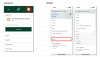
- Ensure that there is a check mark badge with the words “Verified” next to each of your phone numbers.
- For any phone number that is not verified, a hyperlink will appear next to it with the word “Verify.”
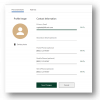
- Selecting that link will bring you to a prompt asking how you would like to receive a one-time passcode to that phone number. From the “Delivery Method” drop down, you will want to select “Text Message” or “Voice Message.” This will set up the default method of MFA for that phone number.
- A code will be sent to you via the selected delivery method. Enter it in the space provided and select the “next” Button.
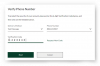
- You will be returned to your profile screen, and the phone number that went through this process will now display the check mark badge with the words “Verified.”
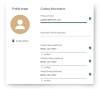
- Continue to repeat this process with any phone number that you would like to be available to use as an MFA option.
- Navigate to the “Profile” menu.
- I am interested in utilizing Push Authentication. How can I set that up?
- First, ensure that the most up-to-date eBranch mobile app is installed on the mobile or tablet device you would like to receive Push Authentication notifications delivered. You will have had to log in to your eBranch account at least once through the mobile app on this device to utilize it for Push Authentication. Please note: Deleting the eBranch app from the device will cause Push Authentication to fail.
- To set up Push Authentication, log in to your online banking account and navigate to your “Security” page.
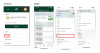
- From the “Security” page, select the “Devices” tab. This tab should display all devices that have ever logged into your account, unless already deleted by you or a Credit Union admin at your request.

- From the device list, locate the mobile device you would like to set up for Push Authentication. You may want to review the name of the device and edit it for clarity.
- There is a button to select called “Enable Push Authentication.” Select this and you will be sent a Push Authentication to your device. Select the “Yes, this is me” button on your device, and you will be all set.

*Please note, Push Authentication will override all other authentication channels other than an Authentication App.
- What is an Authenticator App? Why should I use it? How can I set it up?
An Authenticator App is an app downloaded from your mobile device’s app store that provides you one-time passcodes when needed for MFA. These apps always have codes available and the codes refresh every 60 seconds. They are the most secure of all of the options for MFA. You will not have to wait to get a MFA, as they are always available to you.
To set up an Authenticator App:
- First, select the Authenticator App you prefer from your device’s app store. The following apps have been tested and are compatible with Lumin:
- Microsoft Authenticator
- Google Authenticator
- Okta Verify
- Twilio Authy
- From a computer, login into your online banking and once again, navigate to Security.
- Here, select the “Authentication” tab.
- Scroll to the bottom of the page, and locate the Authentication App Section (above the footer).
- After downloading the app of your choice, open it. It should have a plus (+) sign or other indicator to add a service.
- In most services, you can simply scan a QR code that appears in your online banking, and then enter the 6-digit code that appears.
- Then you are all set!
- First, select the Authenticator App you prefer from your device’s app store. The following apps have been tested and are compatible with Lumin:
- Is email being removed as a channel for password resets?
No. Members will still be able to receive password resets, alerts, statement notifications, electronic notices, secure message notifications, and other account information via email.
- What happens if my phone numbers are not verified by the go-live date?
You will still be able to log in! The Contact Center is available 24-hours per day to generate a one-time passcode to be used for MFA. We ask that you take the important steps in verifying your phone numbers to help ensure a smooth transition away from utilizing email as an MFA option.
- When is email being removed as an MFA option?
Email will be removed as an MFA option on Tuesday, July 16.
- Can I set up a Push Authentication or an Authentication App to log into more than one account?
Yes!
- Can I set up a Push Authentication or an Authentication App for two different devices?
Yes!
- I’m trying to login to online banking, but the location it is showing me on the Push Authentication is incorrect. Should I say “No it’s not me”?
When in doubt, please select “No, it is not me” and reach out to our Contact Center 24-hours a day – 888.252.8932.
- Is there any way to know who is attempting to log in when using Push Authentication?
Yes! Please name your devices appropriately – for example “iPhone Captain Credit Union.” This device name will display on the Push Authentication screen on your device. When in doubt, please select “No, it is not me” and reach out to our Contact Center 24-hours a day – 888.252.8932.
Refinancing a Personal Loan, Auto Loan or Recreational Vehicle Loan 3
- Why should I consider refinancing?
When interest rates decrease or your credit score improves, you may be able to save some money on your monthly payment by refinancing your personal loan, auto loan or recreational vehicle loan.
- How can I refinance my personal loan, auto loan or recreational vehicle loan?
If you are interested in refinancing your personal, auto or recreational vehicle loan, call us at 888.252.8932, start a video branch session, or visit your local branch to learn more.
- Do you need to run my credit to refinance a personal loan, auto loan or recreational vehicle loan?
If it has been more than 120 days since you applied for your personal loan, auto loan or recreational vehicle loan, we will need to pull your credit. If it is less than 120 days, we do not need to run your credit again unless you think your credit score has improved, and you want to explore a possibly lower monthly payment.
- How long does refinancing take?
Typically, most refinancings of personl loans, auto loans or recreational vehicle loans can be turned around in one business day.
- What would the refinance process look like?
We already have most of the required information from your previous loan application, so to refinance a personal loan, auto loan or recreational vehicle loan, we would just need to update anything that might have changed since then.
- Am I eligible to refinance my personal loan, auto loan or recreational vehicle loan?
You are eligible to refinance a personal, auto or recreational vehicle loan at any time.
- Is there a fee to refinance my personal loan, auto loan or recreational vehicle loan?
There is no fee if it is your first time refinancing the loan. If you have previously refinanced a personal loan, auto loan or recreational vehicle loan, there is a $30 fee associated.
Download Our App
Heritage Family Credit Union has online banking apps for Android® and iPhone® devices.
Locations
Whatever your financial needs - day or night - you have access to your account information to help you meet your demanding lifestyle. From our branches, apps, and call center, we are here to serve you wherever you are.